
The Cookie Wall feature allowes you to block users from your website, that did not make a choice yet. Once enabled, all new visitors will be immediatly redirected to a dedicated consent page (“cookie wall page”) where they will see the consent layer and need to choose. Only when the visitor made their choices, they are redirected back to the original website.
Why using a cookie wall?
A cookie wall has several advantages, when implemented correct:
- Visitors must make a choice and cannot surf the website without making a choice. This can lower the Ignore rate.
- Cross-Domain consent is possible, even with browsers that do not support 3rd Party cookies.
- No code is loaded before consent: If websites implement a “hard wall”, no cookies and no codes can technically load before a choice is made (highest legal safety).
Why NOT using a cookie wall?
A cookie wall also has several disadvantages you should be aware of before activating the feature:
- All new visitors will be redirected away from the original website and onto the cookie wall page. This may lead to poor user experience (UX).
- Searchengine-crawlers may see the cookie wall instead of the original website and therefore may not be able to index the actual website (may lead to lower SEO).
How to implement a cookie wall?
Soft cookie wall
In order to enable the soft cookie wall, please go to Menu > Legal and enable Cookie Wall. Please also add a fallback-URL (your website URL) in case when the original URL could not be found.
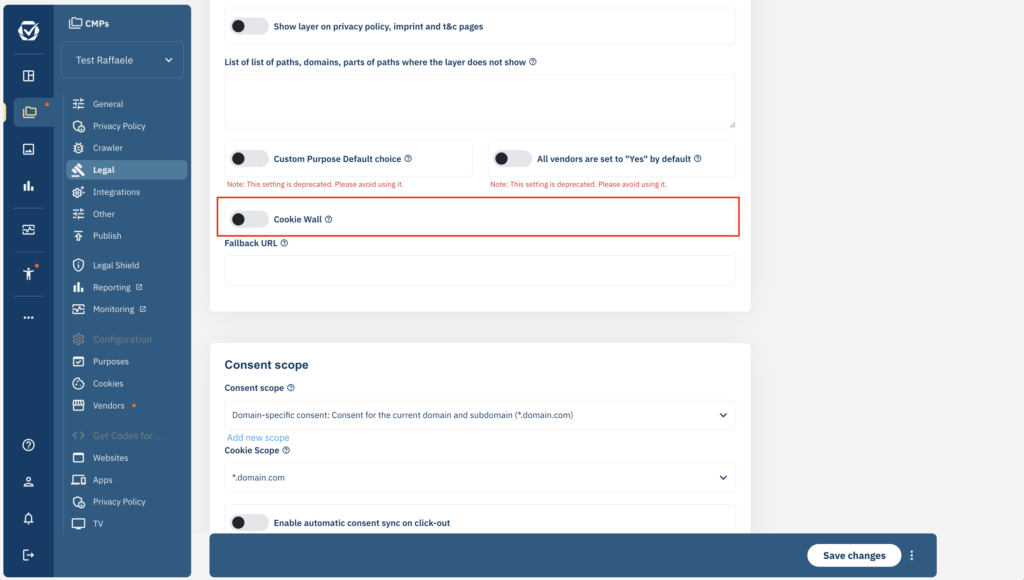
Once enabled, the system will automatically redirect all visitors by detecting the consent choices via JavaScript. Visitors that disable JavaScript or use an AdBlocker might still be able to visit your website without making a choice.
Hard cookie wall
For a “hard” cookie wall, the webserver itself (= your website) is performing the redirect and not the consentmanager JavaScript. In order to do this, please enable the Cookie Wall as described above. In addition, please add logic to your website to check whether any cookie with a name beginning with __cmp is present OR whether a URL-parameter named cmpignorewall is present. If both are not the case, redirect to http://cdn.consentmanager.net/delivery/cookiewall/[CMPID]/ where [CMPID] is the ID of your CMP.
Example code in PHP:
<?php

 $sendToCookieWall = true;
 if(isset($_REQUEST['cmpignorewall'])){$sendToCookieWall = false;}
 else if(isset($_COOKIE))
 {
  foreach ($_COOKIE as $name => $value)
  {
   if(substr($name,0,5) == '__cmp')
   {
    $sendToCookieWall = false;
    break;
   }
  }
 }

 if($sendToCookieWall)
 {
  header('Location: https://cdn.consentmanager.net/delivery/cookiewall/123/?cmpcookiewall#ref='.urlencode($_SERVER['REQUEST_URI']));
  exit;
 }

...