
Le plugin a été testé pour les versions 2.3.0.2, 3.0.0.0, 3.0.1.1, 3.0.1.2, 3.0.2.0, 4.0.0.0_b, 3.0.3.0, 3.0.3.1, 3.0.3.2, 3.0.3.3, 3.0.3.5, 3.0.3.6, 3.0.3.7
1. Créez un CMP pour votre site web (https://consentmanager.net/help/getting-started/3-create-a-cmp/)
2. Installez ce plugin
:- Téléchargez l'application sur la boutique officielle OpenCart : https://www.opencart.com/index.php?route=marketplace/extension/info&extension_id=42268
OU
– Téléchargez le plugin ici : consentmanager_opencart.zip
3. Récupérez votre identifiant de code CMP et saisissez-le dans les paramètres du plugin :
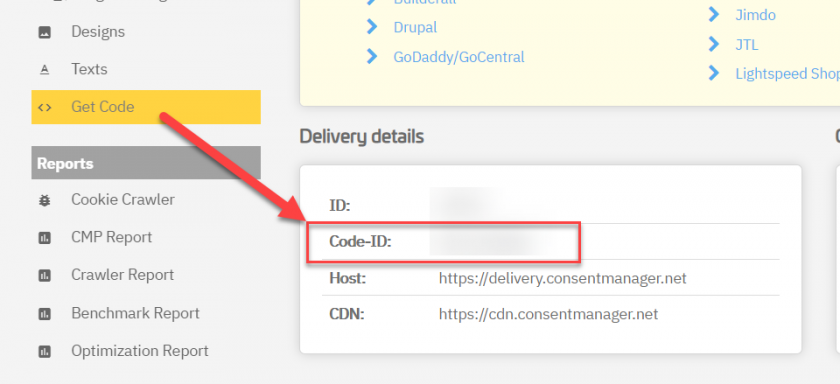
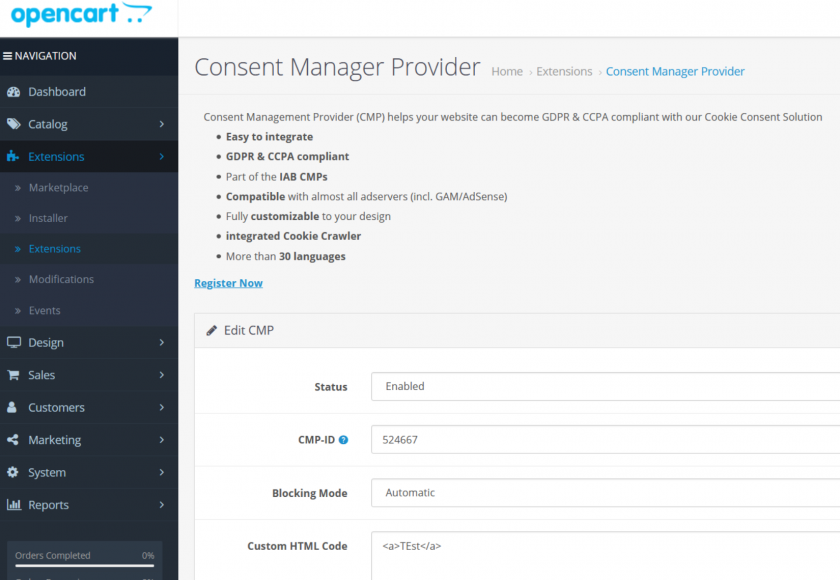
4. Choisissez si vous souhaitez utiliser le code automatique ou semi-automatique (https://consentmanager.net/help/getting-started/6-integrating-the-code/)
5. C'est terminé !