
Accessibility WIDGET
Make your website accessible for every visitor
Give every visitor better access to your content while helping your team align with WCAG standards and the European Accessibility Act.
Install in minutes. No complex setup required.
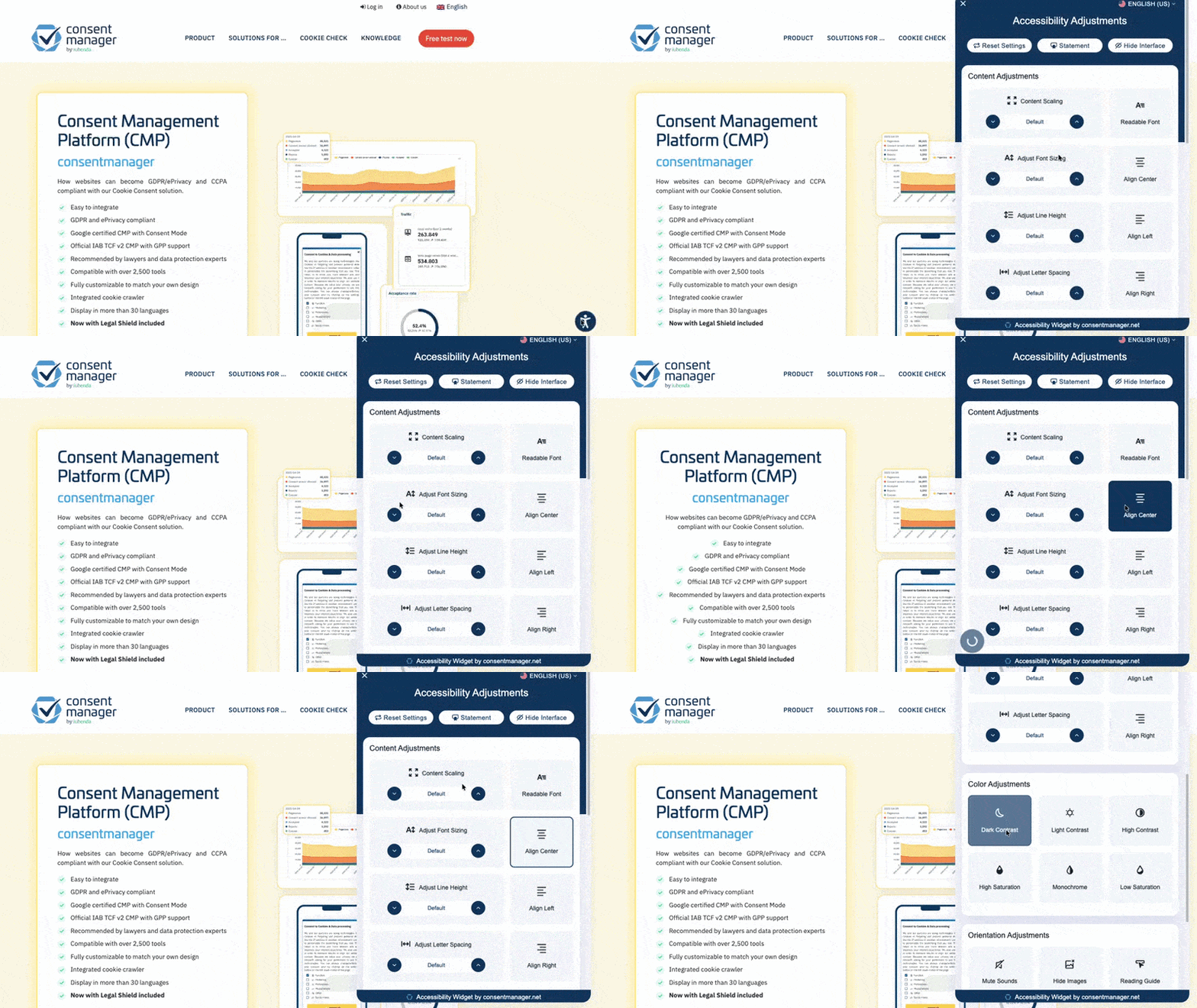
Accessibility affects both user experience and legal risk
If visitors struggle to navigate your website, read your content, or interact with forms, they leave.
Accessibility regulations like the European Accessibility Act and standards such as WCAG 2.1 and 2.2 also set clear expectations for digital services.
Without visibility into accessibility gaps, teams rely on manual checks and assumptions. What you need instead is clear insight and practical tools to identify and fix issues before they turn into non-compliance.
Two tools, one goal: better accessibility
Accessibility Widget
Add real-time accessibility controls to your website
Visitors can adjust the site to their needs with a single code snippet — without changing your core structure.
- Text size and spacing
- Color contrast
- Link and heading highlights
- Keyboard navigation support
- Reading assistance features
Accessibility Scanner
Analyze your website to detect accessibility gaps
Instead of reviewing pages manually, your team receives a clear overview of what to improve.
- Detects common WCAG-related issues
- Highlights structural and semantic gaps
- Identifies contrast and navigation problems
- Provides a structured issue list for your development team
Accessibility Widget
Add real-time accessibility controls to your website
Visitors can adjust the site to their needs with a single code snippet — without changing your core structure.
- Text size and spacing
- Color contrast
- Link and heading highlights
- Keyboard navigation support
- Reading assistance features
Accessibility Scanner
Analyze your website to detect accessibility gaps
Instead of reviewing pages manually, your team receives a clear overview of what to improve.
- Detects common WCAG-related issues
- Highlights structural and semantic gaps
- Identifies contrast and navigation problems
- Provides a structured issue list for your development team
Accessibility improves more than compliance
Reduce friction across user journeys
Accessible navigation, readable text, and clear structure make it easier for all visitors to engage with your content.
Reduce friction across user journeys
Accessible navigation, readable text, and clear structure make it easier for all visitors to engage with your content.
Increase engagement and retention
When visitors can use your site without barriers, they stay longer and return more often.
Support alignment with EU accessibility expectations
The European Accessibility Act sets clear requirements for digital services. Having the right tools supports your alignment efforts.
Give product and development teams clearer guidance
The scanner translates accessibility gaps into a structured issue list your team can act on directly.
Improve the user experience while reducing regulatory uncertainty
Accessibility improvements benefit all users, not just those with specific needs, while helping you stay ahead of compliance requirements.
Increase engagement and retention
When visitors can use your site without barriers, they stay longer and return more often.
Support alignment with EU accessibility expectations
The European Accessibility Act sets clear requirements for digital services. Having the right tools supports your alignment efforts.
Give product and development teams clearer guidance
The scanner translates accessibility gaps into a structured issue list that your team can act on directly.
Improve the user experience while reducing regulatory uncertainty
Accessibility improvements benefit all users, not just those with specific needs, while helping you stay ahead of compliance requirements.
From installation to insight in four steps
Clear setup. Actionable results.
Step 1
Install the snippet
Add a lightweight script to your website. Works on any platform.
Step 1
Install the snippet
Add a lightweight script to your website. Works on any platform.
Step 2
Activate the widget
The accessibility menu appears instantly for your visitors.
Step 3
Run the scan
The scanner analyzes your pages for accessibility gaps against WCAG criteria.
Step 4
Review and improve
Use the structured issue list to guide targeted updates across your site.
Step 2
Activate the widget
The accessibility menu appears instantly for your visitors.
Step 3
Run the scan
The scanner analyzes your pages for accessibility gaps against WCAG criteria.
Step 4
Review and improve
Use the structured issue list to guide targeted updates across your site.
Built for evolving accessibility requirements
Accessibility expectations continue to develop across the EU and other regions.
The widget supports user-side accessibility adjustments. The scanner supports structured improvements on your site. Together, they help your team move toward stronger accessibility alignment.
Common questions about our accessibility tools
No tool can guarantee full compliance. The widget and scanner help identify and address accessibility gaps. They should be part of a broader accessibility strategy that includes accessible design and development practices.
The scanner focuses on WCAG 2.1 and 2.2 criteria. It can support alignment efforts under the European Accessibility Act and related frameworks.
No. The widget gives users additional control over how they view your site. It does not replace semantic structure, accessible code, or inclusive design.
The widget uses a lightweight script designed to minimize performance impact.
Yes. You can use the scanner independently or combine both tools.
No tool can guarantee full compliance. The widget and scanner help identify and address accessibility gaps. They should be part of a broader accessibility strategy that includes accessible design and development practices.
The scanner focuses on WCAG 2.1 and 2.2 criteria. It can support alignment efforts under the European Accessibility Act and related frameworks.
No. The widget gives users additional control over how they view your site. It does not replace semantic structure, accessible code, or inclusive design.
The widget uses a lightweight script designed to minimize performance impact.
Yes. You can use the scanner independently or combine both tools.
Improve accessibility and reduce compliance risk
Identify accessibility gaps. Give visitors better control. Support structured improvements across your site.